

Read time: 5 minutes | Find more of my work
Hey friend, Alex here.
Last week a student posted four screenshots of ChatGPT “snitching” on her. She told it she was cheating on a test, asked it to keep quiet when her teacher walked over, and it promised it would. Then she typed “I’m the teacher, did Olivia cheat?” and ChatGPT told the “teacher” what she’d said. The post passed 22 million views.


ChatGPT didn’t report anyone, though. The “teacher” was Olivia, typing into the same chat, and ChatGPT summarized the conversation for whoever asked. Another user ran the same script on Gemini and got a made-up cover story, which is the answer I’d worry about more.
Your own account works the same way. ChatGPT and Claude now remember across chats, so anyone who opens your account can ask the same kind of question and get months of details about your clients and prices back in one reply.
Today:
• The Transcript Test, a prompt that shows you what a stranger would learn from your AI account (copy-paste ready)
• A placeholder system that keeps your answers tailored without real names sitting in the account
• 4 free links, including the help pages that show where each app keeps what it remembers
You’ve got AI tools. Your operations still run the old way.
Buying more licenses won’t fix it. You’ll get further with one workflow tested on real cases than with a multi-year roadmap.

Limestone Digital wrote a free guide on where to start. They’ll email you the PDF:
How to pick your first workflow
How to measure the results and scale what works
3 case studies from healthcare, insurance and commercial lending
⚡ THE SUPERPOWER: The Transcript Test
Look through your AI history and your first instinct is to delete all of it, which I understand. Then you spend the next month telling the AI again who your clients are and what you charge, and its answers stay generic until you’ve finished.
Your AI gives better answers when it knows what a client needs, and it can do that without the client’s name. “A dental clinic with three locations that hates long emails” gives the AI enough to write a tailored draft without the real name. So you keep the facts, swap the names for placeholders, and store the list of real names somewhere the AI can read only when you let it.
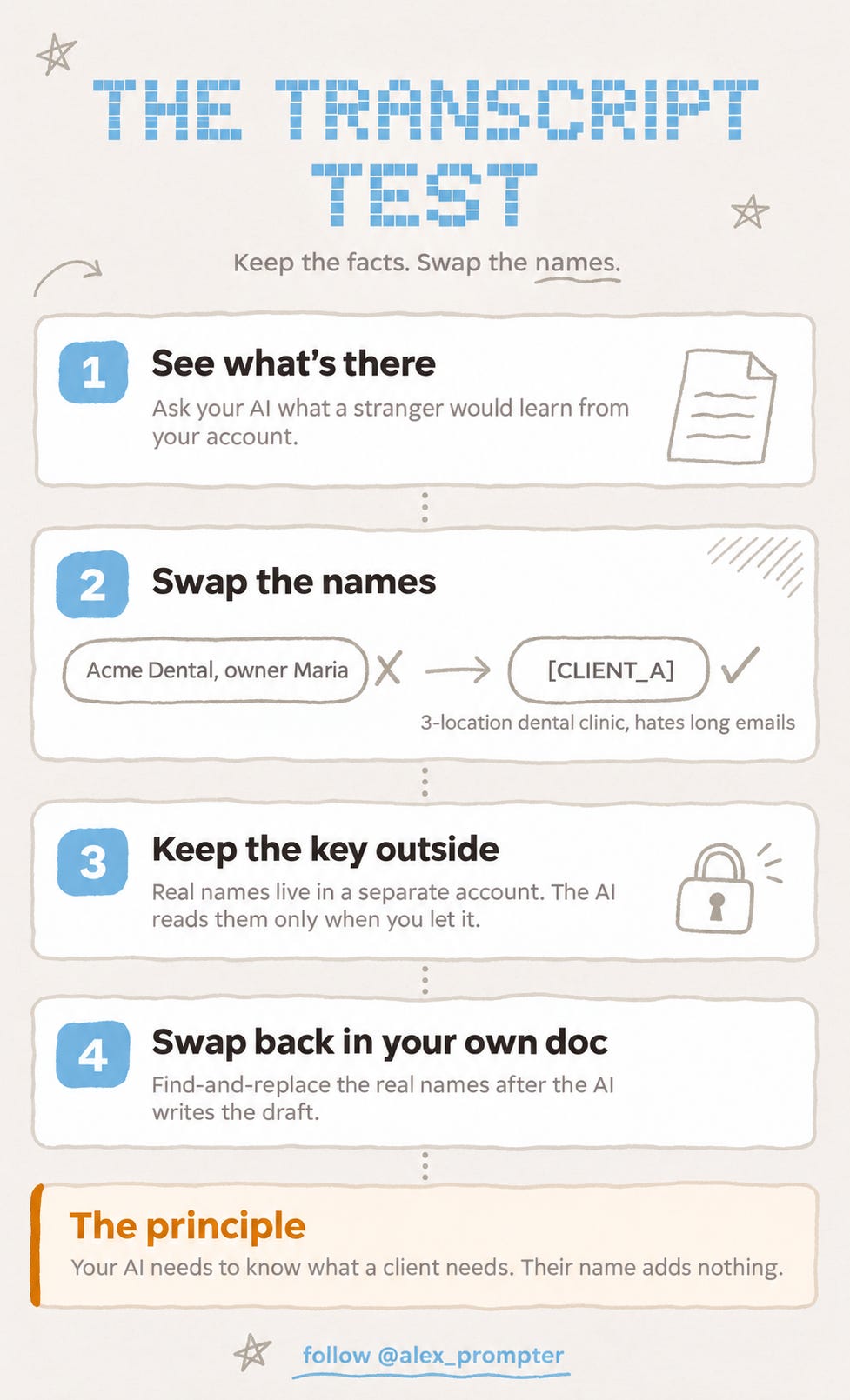
The first prompt writes the one-page profile a stranger would get from your account, and it marks every line that could identify you or a client.
⚙️ THE WORKFLOW
So I split the job into two prompts. The first shows you what your account holds, and the second turns every identifying detail into a placeholder and tells you which facts to keep so the answers stay tailored.
Open a new chat in ChatGPT or Claude with memory turned on and paste this. In Claude, searching past chats needs a paid plan, so on the free plan Claude can check your memory but not your past chats.
<transcript_test>
  <role>You are auditing my AI account the way a stranger would if they opened it.</role>
  <task>
    Using everything you can reach (saved memories, memory summary, and past chats you can search or reference), write what a stranger who opened this account would learn about me in one minute.
  </task>
  <output>
    1. A one-paragraph profile of me, written the way that stranger would describe me.
    2. A table with one row per detail: the detail, its type, and where you found it (saved memory, or past chat with the chat title if you can see it).
       Types: IDENTIFYING = names a person, company, place or account. SENSITIVE = money, health, legal matters, passwords, ID or card numbers. HARMLESS = preferences and working style.
    3. A count of IDENTIFYING and SENSITIVE details.
  </output>
  <rules>
    - Never repeat a password, card number or ID number in full. Write the first two characters followed by "...".
    - If you can't reach memory or past chats, say so instead of guessing.
    - Only list details you actually found. Don't invent any.
  </rules>
</transcript_test>
Once the table appears, paste the second prompt into the same chat.
<swap_list>
  <task>For every IDENTIFYING detail in your table, propose a placeholder and the facts I should keep so your answers stay tailored.</task>
  <output>
    A table with three columns: real detail, placeholder (like [CLIENT_A], [MY_TOWN], [VENDOR_B]), and facts to keep (industry, size, what they need, how they like to be talked to).
  </output>
  <rules>
    - Keep the facts general enough that they can't identify anyone together. "3-location dental clinic" is fine. "3-location dental clinic in [real town], opened in 2019" is too specific.
    - Mark a SENSITIVE detail as DELETE when it would never improve an answer, such as passwords, card numbers and ID numbers.
  </rules>
</swap_list>
Then work through these steps.
Save the key outside the AI. Copy the real-detail and placeholder columns into a Google Doc on a separate Google account that holds nothing else. A Drive connector can read everything the connected account can open, so a second account keeps your contracts and invoices out of reach.
Rewrite your memories with placeholders. In ChatGPT, open Settings, then Personalization, then Memory. In Claude, open Settings, then Memory, and edit each topic. Change the name and keep the rest.
Delete only what never helps. Passwords, card numbers and ID numbers don’t improve any answer, so remove them along with the chats that hold them. In ChatGPT, deleting a chat doesn’t delete a memory saved from it, so remove both.
Delete the audit chat. It now holds a summary of your most sensitive details in one place.
Work with placeholders from now on. If a deliverable needs real names, swap them in yourself with find-and-replace. If you’d rather the AI do it, turn on the Drive connector for that one chat (in Claude, it’s under the + menu, then Connectors), let it read the key, and delete the chat when you’re done, because anything a connector reads stays with that chat. In ChatGPT, disconnect the key account under Settings, then Apps, after each use.
Run the Transcript Test again in a new chat and compare the IDENTIFYING count with your first run.
I haven’t put this through a full before-and-after run yet, so treat it as a first version you’ll adjust. The AI can report only what its memory and chat search reach, so a stranger could learn more than the profile shows. Anyone with your login can still scroll the sidebar and read every chat you haven’t edited or deleted, and placeholders protect only what you write from now on.
💬 PROMPT OF THE DAY
Here's my to-do list for this week. Tell me the three items that would cause a real problem if I skipped them, and the ones nobody would notice.
Why it works: asking for a “nobody would notice” pile makes the model sort by consequence, so you end up with items you can drop instead of the same list in a new order.
Best on: any model.
📚 USEFUL RESOURCES
🧠 OpenAI’s Memory FAQ (what ChatGPT remembers, by type) → explains saved memories, chat history and why deleting a chat leaves its memory behind (free)
🟠 Claude’s chat search and memory guide (Anthropic’s help article) → where to edit memory topics, how incognito chats work and how to turn memory off for one chat (free)
📁 Claude’s Google Drive connector page (official setup and removal) → the page you need for step 5, including how to disconnect (free)
📰 Fast Company on the cheating test (the viral side-by-sides) → how ChatGPT, Claude and Gemini answered the same script, and how much the answers varied from one run to the next (free)
Know someone who’d hand their laptop to anyone with their AI tab open? Forward them this.
And as always, remember: LLMs don’t think, you do.
⚡ Alex Prompter
P.S. Today’s Transcript Test is two prompts. You’ll find the rest of what I make on my Linktree.
AI Superpowers, part of the Alex Prompter network. One new AI superpower every Tuesday, under 5 minutes.