

Read time: 5 minutes | Find more of my work
Hey friend, Alex here.
Over Halloween weekend, some Grok Bot users woke up to find their weekly usage had jumped from 50% to 100%. One of them posted that she’d have to wait until Wednesday to use her bots again.
If you’ve started handing real work to an agent, you know how that feels. Your project stops when your usage runs out, and it can run out halfway through something. You can’t control what a company does to its limits, but you can control how much each work session uses.
Today:
A simple way to plan vibe coding and agent sessions, so one job doesn’t take your whole week (vibe coding means building software by telling an AI what you want)
Four copy-paste prompts with hard stops against loops
4 free resources, including the Claude Code team’s guide to managing costs
📰 WHAT HAPPENED LAST WEEK
Musk confirmed the jump wasn’t a glitch. Asked about a reset, he replied that the cost of serving Grok Bot was “unsustainably high relative to revenue.” TechCrunch reports that he hasn’t said how limits will change from here.

Claude users got better news, with a catch. Anthropic removed the 5-hour limit for verified Ultra accounts and kept the weekly limit, so even a $200-a-month plan has a limit on your week.
The same week, Andrej Karpathy built HackerTube, a YouTube-style site of videos that people keep recommending on Hacker News, in about two hours. Claude first cut 43 million comments down with simple text rules, and only what was left went to Sonnet, a cheaper model. He also runs Opus 5.5 on Medium effort by default. Effort is a setting for how much reasoning the model does.
⚡ THE SUPERPOWER: The Hard-Stop Session
Picture a normal build session. You open an agent after lunch and ask it for a booking page. It works, so you ask for a change, then another, then a fix for something unrelated. Three hours later you’re in the same chat, and the agent is on its fourth try at the same error.
That chat uses more than it looks like it should. A token is a small piece of text, about three quarters of a word, and your agent spends tokens on what it reads and writes. Claude Code sends your full conversation with every request, so a one-line question at the end of that session still draws usage for the whole conversation.
Agent teams add up the same way. Cursor’s staff told one Grok Bot user that most of the 43% he’d used came from one morning, when his bots created about 60 new bots and each bot that received a message ran its own turn. A routine that checks your inbox every hour runs 168 times a week.
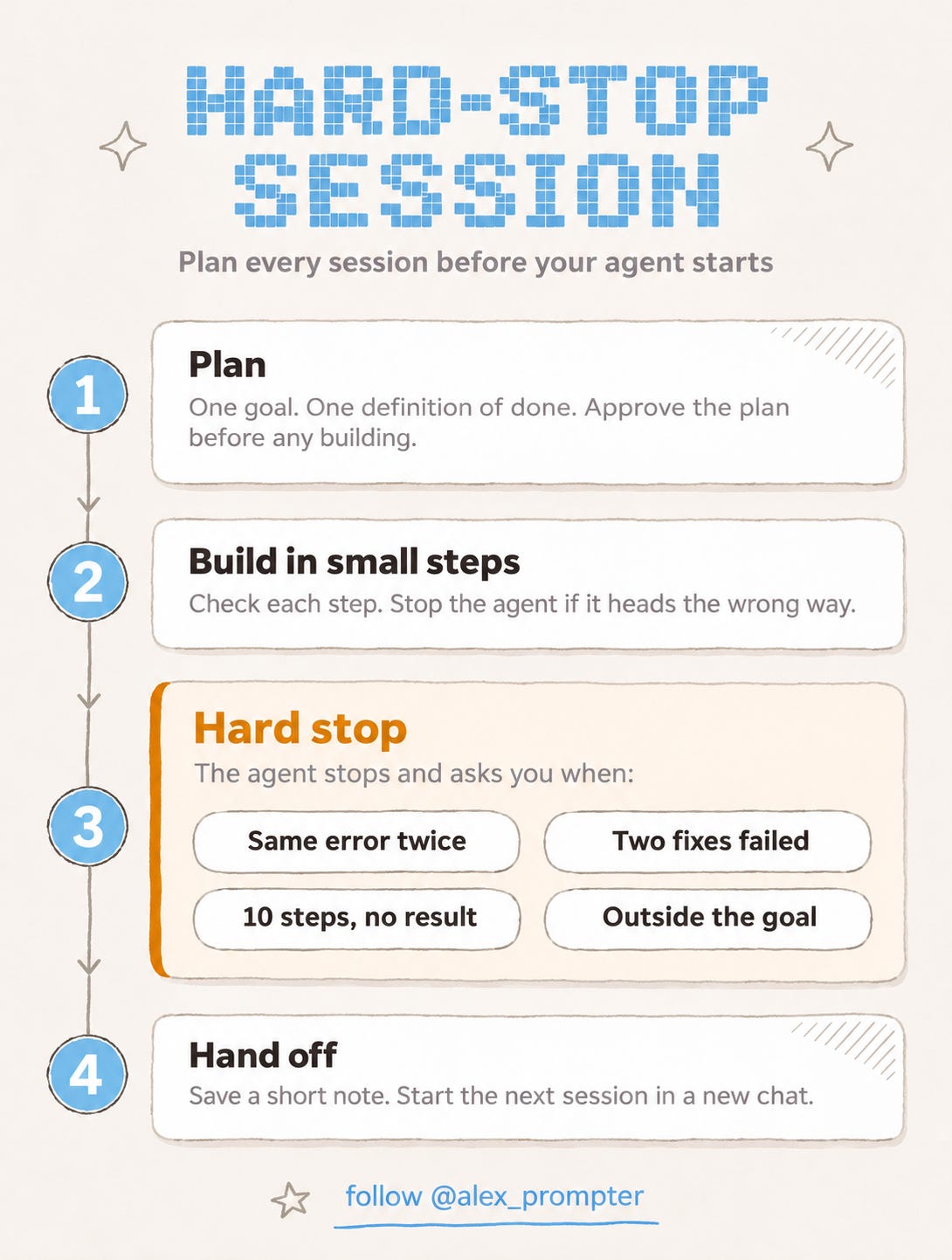
So plan each session before it starts, with one goal, one definition of done and written rules for when the agent has to stop and ask. I call those rules hard stops. An agent won’t notice that it’s using up your week, so the stop has to exist before the work begins.
By the end of this email, you'll have a plan for your week and four prompts you can paste into your agent today.
⚙️ THE WORKFLOW
Start with your week. Open your usage screen, find your reset day and divide the week by seven. By day three, you want to be under about 43%. Put your biggest job right after the reset, so one bad run doesn’t leave you without your agent for days. On Claude plans with a 5-hour window, the window starts with your first message, so give each window one main job.
Then run each session in the same order.
Set the goal. Check your usage, pick one job and decide what done looks like.
Approve a plan. Paste the Session Starter below and read the plan before the agent builds anything.
Build in small steps. Check each step. If the agent heads the wrong way, stop it right away (in Claude Code, press Escape).
Take care with breaks. On a Claude subscription, a message sent after more than an hour away reprocesses your full context, which means everything the agent is carrying in that chat. If you’re taking a long break, end the session first.
Hand off. Paste the Session Closer, save the note and start the next session in a new chat.
Here are the four prompts. Save the Hard Stops where your agent keeps lasting rules, which means project instructions in Claude or ChatGPT and CLAUDE.md in Claude Code. In Grok Bot, send them in chat and ask the bot to remember them.
1. Session Starter
<session_starter>
  <goal>[ONE GOAL]</goal>
  <done_when>[HOW I'LL KNOW IT'S DONE]</done_when>
  <out_of_scope>[WHAT YOU SHOULDN'T TOUCH]</out_of_scope>
  <instructions>
    Restate the goal in one line. List your steps in five lines or fewer. Name the files or sources you expect to read. Then wait for my yes before you do anything.
  </instructions>
</session_starter>
2. Hard Stops
<hard_stops>
  <rule>Stop and ask me before you continue if any of these happen.</rule>
  <stops>
    1. The same error appears twice.
    2. Two fixes in a row fail.
    3. You've taken 10 steps without showing me a working result.
    4. You want to read more than 5 files, or one very long file or folder.
    5. You want to create a bot, subagent, group chat or scheduled task.
    6. You want to install something.
    7. You'd change anything outside the agreed goal.
    8. You're about to retry, wait or check something again on a repeat.
    9. You'd rewrite a whole file when a small edit would do.
  </stops>
  <when_you_stop>
    Tell me which stop you hit, what you tried and what you suggest, in three lines or fewer. Then wait.
  </when_you_stop>
  <habits>
    Use search or filters before you read anything long. Keep replies short, with no recap.
  </habits>
</hard_stops>
3. Loop Breaker
Paste this if the agent keeps repeating the same attempt.
<loop_breaker>
  Stop working now and don't run anything else.
  1. List what you've tried, one line each.
  2. Say what each attempt showed.
  3. Name the most likely cause and how sure you are.
  4. Propose one next step and say what you need from me.
  Then wait for my answer.
</loop_breaker>
4. Session Closer
<session_closer>
  Write a handoff note for a new chat, in under 150 words.
  Include the goal, what's done, what's still broken, the decisions we made and why, the next step and the files that matter.
  Save it as HANDOFF.md if you can write files. If you can't, put it in a code block.
  Don't start any new work.
</session_closer>
Fair warning, a prompt can’t force an agent to stop. An agent can ignore a hard stop, so back these prompts up with settings that set a real limit.
Grok Bot. Decide what happens when your weekly usage runs out. On older Cursor plans, keep on-demand usage off or set a monthly limit. On The X Subscription, check your additional usage limit and leave Auto Top-up off unless you want it. A bot already running can finish past a monthly limit.
Claude Code. For unattended runs with the
-pflag, set--max-turnsand--max-budget-usd. Spend can pass the budget cap, so leave some room.Any agent. Use lower effort and a smaller model for simple tasks, delete bots you don’t use, turn off connectors you don’t need and keep your always-on instructions short.
The numbers in the Hard Stops are my starting points, so raise them once you trust a project. Too many stops will slow down good work, and a cheap wrong answer that you have to redo costs more than one good run.
None of this protects you from a plan change, which is what Grok Bot users ran into last weekend. Some agents also can’t see their own usage, so keep checking the screen yourself.
💬 PROMPT OF THE DAY
Here's a transcript of a voice note where I explain how I do a task. Turn it into a one-page process a new hire could follow without asking me a question. Flag any step where you had to guess.
Why it works: Writing for someone with no context makes the model spell out the steps you skipped, and the flags show you the gaps in your own explanation.
Best on: any model.
📚 USEFUL RESOURCES
💸 Manage costs effectively (Claude Code’s official guide) → lists what raises usage and how to lower it (free)
📏 Usage limit best practices (Claude’s help page) → short tips for people who use Claude in chat (free)
🧾 Grok Bot plans and billing (Cursor’s help page) → shows what happens on each plan when your weekly usage runs out (free)
📺 HackerTube (Karpathy’s write-up) → a short account of how he works with one agent, including what he did by hand (free)
Know someone who ran out of usage this week? Forward them this issue.
And as always, remember: LLMs don’t think, you do.
⚡ Alex Prompter
P.S. Today’s Hard-Stop Session is four prompts. You’ll find the rest of what I make on my Linktree.
AI Superpowers, part of the Alex Prompter network. One new AI superpower every Tuesday, under 5 minutes.