

Read time: 5 minutes | Unlock my Claude Skills Bundle
Hey friend, Alex here.
Last Tuesday, OpenAI launched dots, agents that take a goal and keep working on it after you close ChatGPT. OpenAI’s announcement on X passed 14 million views within a week.
Dots asks what you want done, works on it while you’re away, and reports back on what it did. Those reports don’t tell you how likely your goal is or whether last night’s work changed that. If you hand it a goal the way you’d write a New Year’s resolution, you’ll find out how it went at the deadline.
Today:
What OpenAI’s dots does, how it decides what to do without you, and who it’s up against
The Probabilistic Goal Brief, a prompt that makes your dot put odds on your goal and update them as it works (copy-paste ready)
4 links worth keeping, including OpenAI’s own explanation of what a dot can do without asking
📰 WHAT HAPPENED LAST WEEK
OpenAI launched dots on September 29 at its developer conference. A dot is an agent with its own cloud computer, running on GPT-6 Astra, that works across the apps you connect and keeps going between conversations. You give it goals, decide what it can do on its own, and talk to it in ChatGPT, Slack, or Teams. It’s rolling out to Pro, Business Premium, and Enterprise users, though Pro users in the EEA, Switzerland, and the UK don’t have it yet.


You set what a dot does without you in two places. Plugins, in Settings, is where you pick the apps it can use, and Custom Rules is where you add your own limits, like never sending email. A separate check called Auto-review compares each send or file change against those rules before it runs. Purchases and permanent deletes always need you, and OpenAI’s own safety post says dots can still make mistakes.
Two similar agents launched before dots. xAI’s Grok Bot went into beta in August and comes with SuperGrok plans, and Meta’s Muse launched for US adults on September 8, in its own app and on WhatsApp. All three work toward your goal on their own cloud computer and follow your permission rules for what they do without asking. The main differences are who can get them and where you talk to them.
The most specific early report comes from Thibault Sottiaux, who works on Codex at OpenAI. He made inbox zero an active goal for his dot, posted on October 2 that his unread mail had dropped from over 9,000 to 6,110, and two days later posted that he’d hit zero.


In the posts I could find, the strongest reports so far come from OpenAI staff, and no post from outside the company about a dot’s mistake had passed 10,000 views. One week is too little evidence to judge how well dots work.
Inbox zero is an easy goal to hand an agent because it comes with its own count, and most goals you’d hand a dot don’t. Three new retainer clients by January can take weeks of work before any count moves, so that goal needs a different number, the probability that you’ll hit it, plus a way to see whether last night’s work changed it.
⚡ THE SUPERPOWER: The Probabilistic Goal Brief
Say you give your dot the goal of three new retainer clients by January. It starts researching prospects and lining up outreach drafts for your approval, and each update tells you what it did. None of the updates tell you whether that work made the goal more likely. They read the same whether your chances are going up or down, so you can’t see the difference until January.
You can’t answer “will this work?” in advance. You can answer “what are the odds today, and what would raise them?”, and an agent that works every night can keep answering that question for you. Probabilistic thinking means you put a number on your chances instead of waiting for certainty, then spend your effort on whatever raises it. Without a number on the goal, you can’t tell whether the work is moving it.
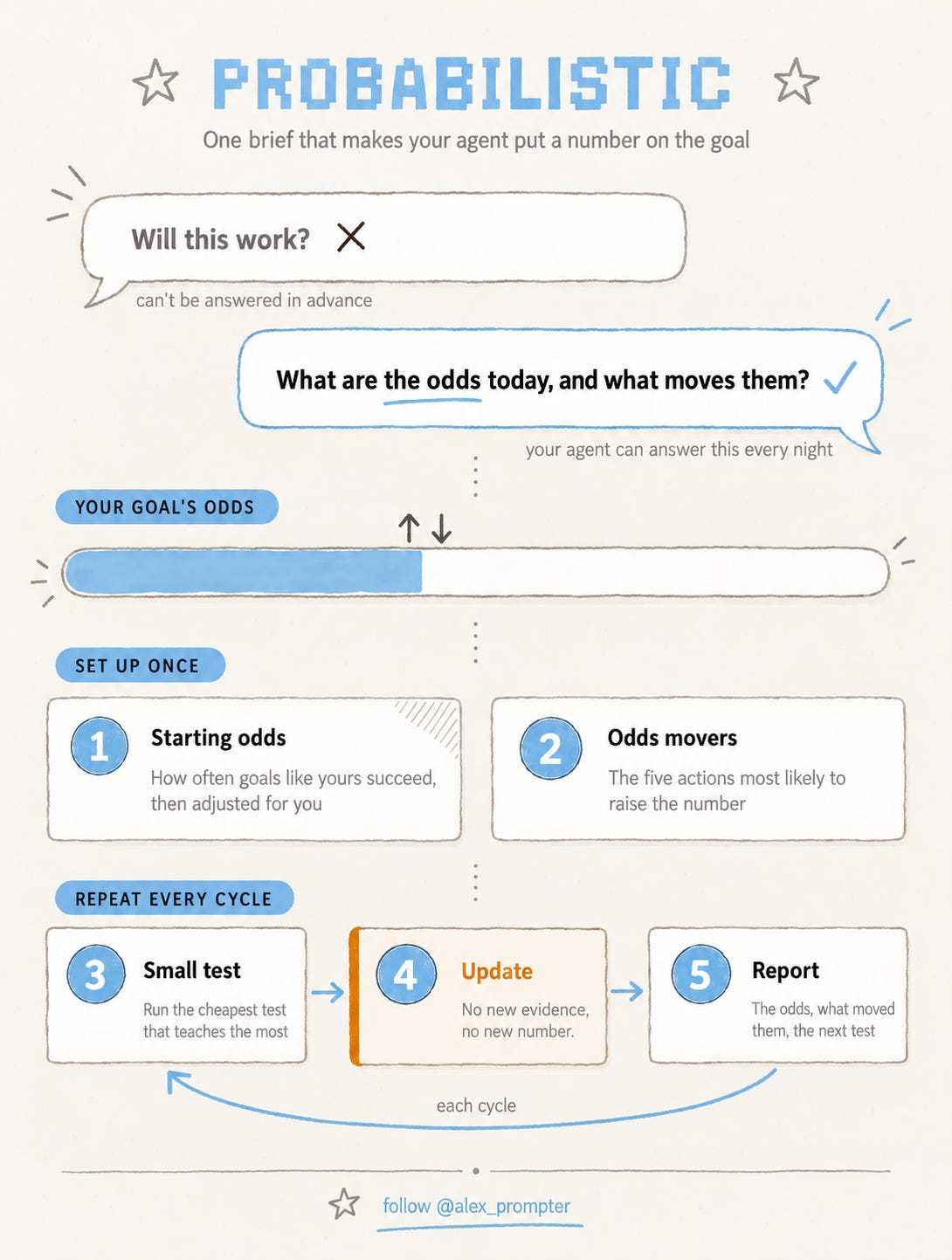
The prompt below makes your agent give you that number on day one, along with the group of similar goals it came from and the five actions most likely to change it.
⚙️ THE WORKFLOW
I wrote one prompt you give your dot as its goal. It puts a probability on the goal before it does anything else, then tells you each time the number moves and why. It works in Grok Bot or Muse too, with different settings behind the brackets.
Paste this as a new goal and fill in the brackets.
You're working toward one goal for me. Treat it as an outcome with a probability that changes as you learn, and keep that probability visible to me.

GOAL: [one sentence, with a number if possible]
DEADLINE: [date]
APPS YOU CAN USE: [the apps you've connected to this agent]
YOU CAN DO WITHOUT ASKING: [copy from your agent's permission settings, e.g. research, reading, drafting, internal notes]
ALWAYS ASK ME BEFORE: [copy from your agent's permission settings, e.g. sending, posting, buying, deleting]
BUDGET: [agent hours, money, or credits allowed per week]
REPORT TO: [where I read your updates, e.g. Slack, WhatsApp, this chat]
REPORT EVERY: [how often]
TELL ME TO RETHINK IF THE ODDS DROP BELOW: [a percentage]

Step 1. Starting odds.
Before you take any action, find how often goals like this succeed for people in a similar position. Name the comparison group and your sources. If you can't find a source, say so and label the number a guess. Give me a starting probability that I reach the goal by the deadline, and the three facts about my situation that move it up or down from that comparison group.

Step 2. Odds movers.
List the five actions most likely to raise that probability. For each one, estimate how much it moves the odds, what it costs from my budget, and whether you're allowed to do it without asking.

Step 3. Small tests.
Each cycle, run the cheapest action you're allowed to take that would teach us the most. Before you run it, write down which result would raise the odds and which would lower them.

Step 4. Update.
After each result, update the probability. Show the old number, the new number, and the evidence that changed it. Never change the number without new evidence.

Step 5. Report.
Every report has four lines: current odds, what changed them since the last report, the next test, and anything waiting for my approval. If the odds stay below my rethink line for two reports in a row, say so plainly and propose a smaller version of the goal or a different route.
In dots, the apps line comes from Plugins in Settings, and the two permission lines should match your Custom Rules. The built-in confirmations apply whatever the prompt says, so purchases and permanent deletes still need you. You can read the reports in ChatGPT, Slack, or Teams.
In Grok Bot, paste the prompt as the Bot’s job when you create it and copy the permission lines from its approval rules, which start every action on Ask every time. In Muse, add it in the Goals tab and match the permission lines to the access you gave each connected app.
Then do five things with what comes back.
Copy the permission lines from your actual settings. If the prompt says the agent can post and your rules say it can’t, the rules win and the agent stalls.
Check the comparison group in the first report. Every later number depends on it, so if it’s wrong, correct it and ask for new starting odds.
Approve the first small test yourself so you see what the agent counts as cheap.
Read each report for the evidence. A move from 22% to 31% matters only if the evidence behind it holds up.
Decide when the odds stay low twice. Shrink the goal, change the route, or keep going with the real odds in front of you. Letting the agent keep working while you put off the decision wastes its budget and your time.
Fair warning, most personal goals have no published success rate, so the starting odds often rest on a loose comparison or a guess, which is why the prompt makes the agent label its guesses. A 31% from an agent is an estimate it committed to, and it means something once you’ve watched it change against real results. The agent also sees only what happens in the apps you connected, so tell it when the deciding moment happens on a phone call or in a meeting.
💬 PROMPT OF THE DAY
Read this [contract / terms of service / policy] and list every place where the other side can change something without asking me first. Give the clause number for each.
Why it works: one-sided change clauses are the terms people miss most, and asking for clause numbers makes the model point to the text instead of summarizing it.
Best on: any model.
📚 USEFUL RESOURCES
🛡️ OpenAI’s dots safety post (what a dot can do without asking) → every dots setting in today’s walkthrough comes from here, and it’s more specific than the launch post (free)
📣 OpenAI’s dots launch post (the official announcement) → examples, plans, and which markets have it (free)
🤖 xAI’s Grok Bot approvals docs (the same controls on the competitor) → worth reading if you’re on SuperGrok and want to run today’s prompt there (free)
📖 Thinking in Bets by Annie Duke (deciding when you can’t be sure) → a plain-language book on judging a decision by the odds you faced instead of by how it turned out ($, bookstores)
What should I break down next, why every AI lab shipped the same kind of agent within a few weeks of each other, or a prompt that writes the guaranteed-failure version of your plan first? Hit reply, one word is enough.
Know someone setting up their first dot? Forward them this.
And as always, remember: LLMs don’t think, you do.
⚡ Alex Prompter
P.S. Today’s Goal Brief is one prompt. My Claude Skills Bundle turns Claude into 20+ specialists for marketing and business. Get it in one click: https://linktr.ee/alex_prompter
AI Superpowers, part of the Alex Prompter network. One new AI superpower every Tuesday, under 5 minutes.