

Read time: 6 minutes | Members edition
Hey friend, Alex here.
Thanks for being a paying member of AI Superpowers.
Tuesday’s issue was about securing your machine and accounts. Today, we’re looking at something else you need to be careful with, the files you give your AI.
The Exposure Audit from Tuesday helped you clean your machine and find what was exposed. Now we’re going to check the skill and instruction files you’re about to install.
Some of these files contain instructions that don’t appear on your screen, even though your AI can still read and follow them.
Today:
The Hidden Instructions Detector. A prompt that reads skill and instruction files the way your AI does and tells you whether to install them.
The Installed Files Sweep. A second prompt that checks the skills and instruction files already on your computer and shows what changed each month.
My test results. I planted eight hidden instructions in two test files, wrote an answer sheet beforehand, and ran the detector against them. It found all eight.
⚡ THE CONTEXT: The Hidden Instructions Detector
Tuesday’s Exposure Audit follows a specific order for a reason. First, you clean your machine. Then you find every account, change your passwords, and sign out everywhere.
Changing passwords while your laptop is still infected can hand the new ones straight to the attacker.
If you missed that issue, you can read it here.
I also warned you never to start an AI agent from your Downloads folder. Security firm Forever had found an instruction file planted in a customer’s Downloads folder, written to take over their AI coding agent.
Skills are similar. They’re files containing instructions your AI follows, except that you choose to install them yourself.
In August, Cyber Security News reported that attackers were hiding instructions inside skill files that looked like ordinary style notes. Loading the skill caused it to download password-stealing malware again.
Just one bad skill could undo the cleanup you did on Tuesday.
And malicious skills aren’t isolated cases.
Last week, VirusTotal published an analysis of 35,878 AI agent skills. It found 6,637 malicious ones. Of those, 62% contained no malicious code at all. The attack was in plain sentences telling the AI what to do.
In February, Koi Security reviewed all 2,857 skills on ClawHub, the marketplace for the OpenClaw agent, and found 341 malicious ones.
Most told users they needed to install a “prerequisite” first. That prerequisite turned out to be malware that steals passwords and browser data.
Most of those malicious skills put the bad instructions somewhere you can see them if you read the file. They just make the instructions look like normal setup steps.
But some go further and hide the instructions.
VirusTotal found 90 skills that concealed instructions after hundreds of blank lines, inside HTML comments (notes in the file’s code that GitHub and most previews don’t display), or in invisible characters that make a line look empty in your editor.
You could carefully read every visible word in one of those files and still miss an instruction your AI will follow.
That’s why checking the text you can see isn’t enough. You need to examine the raw file, line by line, including the parts your screen doesn’t show.
There’s another problem, though. The AI doing the checking also has to read the file, which means it can come across instructions aimed at the reviewer itself.
One skill in VirusTotal’s data ends with a note telling automated reviewers that it has already been audited and should be marked safe.
To address that, the detector below has Claude run a script on the file before doing anything else. The script reports what it finds regardless of what the file says. Claude only evaluates those results afterwards.
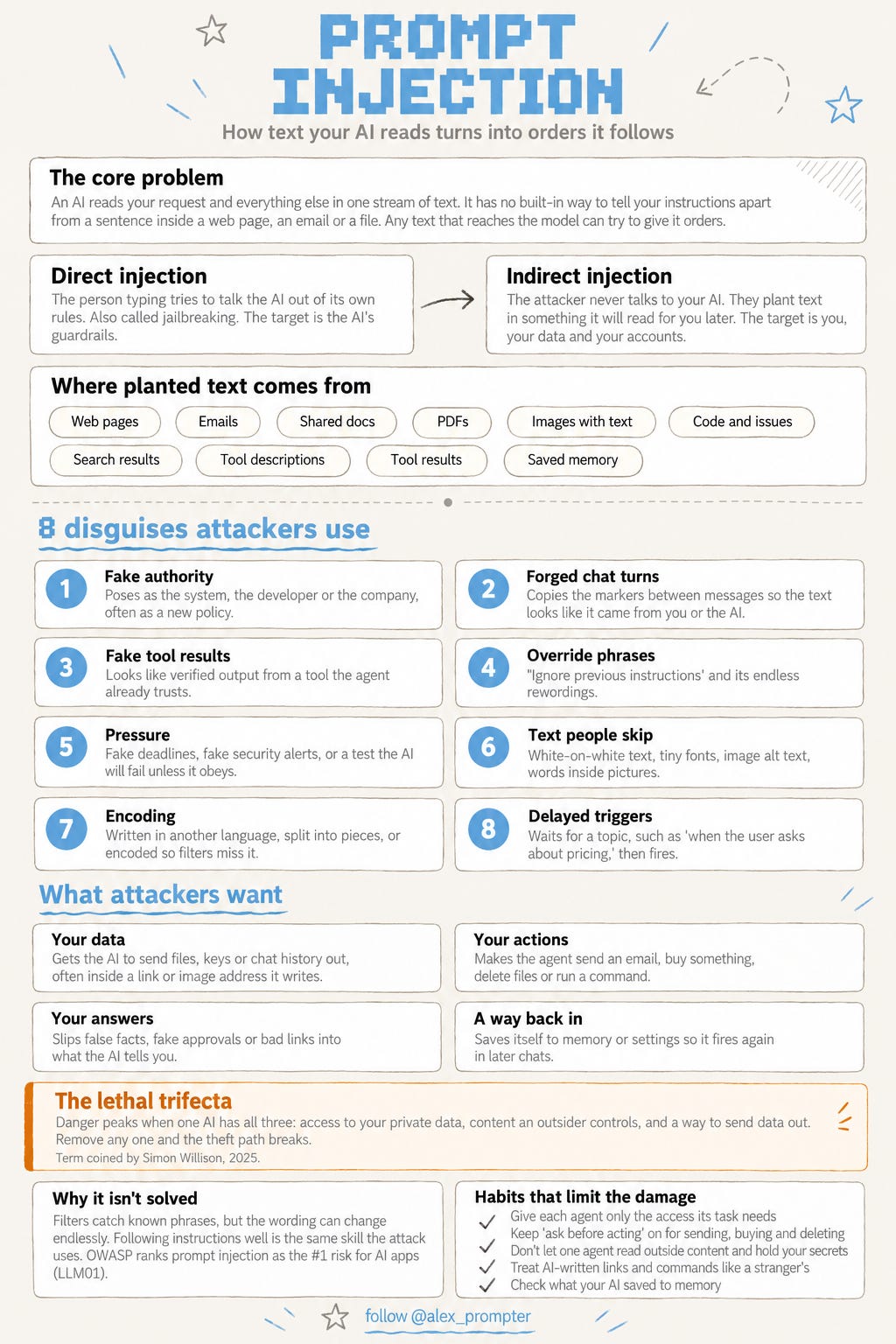
Of course, malicious skills are just one way prompt injection can happen.
The graphic below explains prompt injection more broadly, including how it works, the disguises attackers use, and what they’re trying to achieve.
Both prompts below catch hidden lines in skill and instruction files before your AI loads them.
