

Read time: 4 minutes | Unlock my Claude Skills Bundle
Hey friend, Alex here.
Last week I asked Claude a planning question and got four paragraphs back, with three hedging disclaimers before the first usable sentence. The word “potentially” appeared twice in one line. I scrolled back up, re-read the whole thing, and still wasn’t sure what it was telling me to do.
The stronger these models get at reasoning, the worse they get at saying it plainly. Opus 5 is one of the most capable models around, and some days it’s the hardest to read. The answers are good, but they arrive buried in qualifiers, synonym rotation, and a closing summary that repeats everything you already read.
Today:
The paste-in prompt that forces any AI to answer in short, active, jargon-free sentences, based on a real aerospace writing standard (copy-paste ready)
My honest test: one attempt at content drafting (terrible), then the pivot to conversation clarity
4 free resources including the official ASD-STE100 spec and Google’s free technical writing course
⚡ THE SUPERPOWER: Aerospace Plain English
You paste a question into Claude or GPT and the answer comes back in 200 words when 50 would do, three subordinate clauses per sentence. Hedging stacks where the model tells you “it is important to note that it may potentially be possible to consider...” before you find the actual answer on line four. Then the model calls the same thing “the model,” “the system,” “the engine,” and “the solution” across four paragraphs, and you lose track of which noun means what.
The aerospace industry published a fix for this in 1986. They wrote a standard called ASD-STE100, Simplified Technical English, for aircraft maintenance manuals. The idea: limit writers to roughly 900 approved words, cap sentences at 25 words, force active voice, and require one word per concept held for the entire document. It was designed so a tired mechanic who barely speaks English can’t misread an instruction. Those same rules happen to ban every habit that makes AI responses hard to parse.
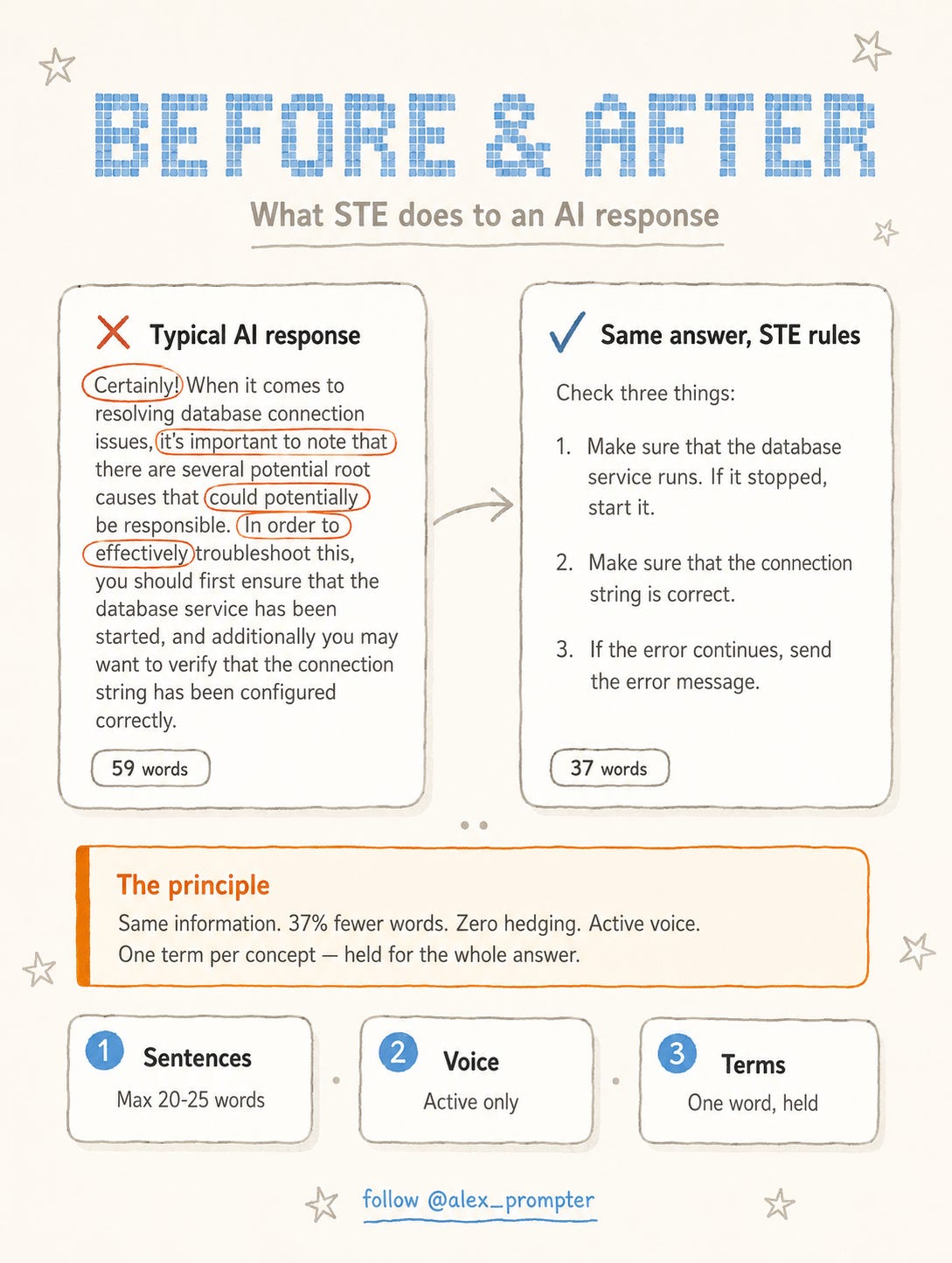
I pasted the prompt below into a Claude conversation and asked a technical question. The response came back shorter, with zero hedging phrases and one term per concept. I read it once and moved on.
⚙️ THE WORKFLOW
The full standard runs 53 rules plus a dictionary of approved words. I stripped it down to the rules that matter most for conversation clarity and put them in a single paste-in prompt.
Open any model (Claude, GPT, Gemini, whatever you use) and paste this at the top of the conversation:
For the rest of this conversation, answer me in Simplified
Technical English (ASD-STE100).

Rules:
- Max 20 words per sentence for instructions. Max 25
  for explanations.
- Active voice. Use verbs for actions, not nouns
  ("adjust the valve", not "make an adjustment to
  the valve").
- One term per concept for the whole conversation.
  Never rotate synonyms.
- No hedging stacks. No "it is important to note",
  no "it may potentially", no "in order to".
- Start with the answer. No greeting, no restating my
  question, no closing summary.
- Use a vertical list for 3 or more items.
- No semicolons.
- Keep code, commands, file paths, and error messages
  unchanged.
Then ask your question. The response comes back short and scannable, one idea per sentence.
It works on every model I’ve tested. The rules are specific enough that even smaller models follow them.
You can paste it mid-conversation if a response comes back too dense. The model course-corrects from that point forward.
I tested this two ways. First, I loaded the full STE skill and tried to draft a social media post. One attempt was enough to see the problem: flat rhythm, stripped personality, every line sounding like an intercom announcement. STE was not built for writing you publish.
Then I flipped the approach and pasted the prompt above before a workflow question. The response came back shorter and cleaner. No hedging, no synonym rotation, no three-sentence warmup before the actual answer. I read it once, got what I needed, and kept moving. The time I usually spend re-reading a dense AI response went away.
The limitation is the same thing that makes it useful: it strips tone and personality out of text. Do not use this for blog posts, pitch decks, creative writing, or anything where rhythm carries meaning. Use it for the working session: troubleshooting, research questions, planning, brainstorming. Turn it off before you ask for a draft that someone else will read.
Want it always on? Paste this longer version into your Claude project’s system instructions, your custom GPT’s configuration, or whatever memory field your model offers:
Always answer in Simplified Technical English (ASD-STE100).

Sentences: max 20 words for instructions, 25 for
explanations. One idea per sentence.

Instructions use the imperative: "Run the test."
Never "You should run the test." or "The test
should be run."

Active voice. Use a verb for an action, not a noun
("adjust", not "make an adjustment").

Approved verb forms only: no present perfect, no
progressive, no "has been".

One term per concept for the whole conversation.
Never rotate synonyms.

No hedging stacks, no "it is important to note",
no "in order to", no "utilize/leverage/facilitate".

No semicolons. Do not drop articles ("the", "a")
to sound terse.

Use a vertical list for 3 or more items.

Start with the answer. No greeting, no restating
the question, no closing summary.

Never alter code, commands, file paths, or quoted
error messages.
Then every conversation in that project starts in STE without you pasting anything. The system prompt version adds a few extra rules the paste-in skips: imperative voice for instructions, banned verb forms, and explicit "don't drop your articles" so the model doesn't mistake short for telegraphic.
💬 PROMPT OF THE DAY
Write your answer as numbered steps. Each step starts
with a verb. Each step has one action. If a step needs
a condition, put the condition first.
Why it works: forces procedural writing structure, the same one-action-per-line discipline that STE uses for maintenance procedures, without requiring the full standard.
Best on: any model.
📚 USEFUL RESOURCES
📄 ASD-STE100 official spec (the full standard, free download) → 53 writing rules and ~900 approved words; the source behind today’s prompt (free, request form: asd-ste100.org)
📚 Wikipedia: Simplified Technical English (best free overview) → history, rule summary, and industry adoption in one page (free: en.wikipedia.org/wiki/Simplified_Technical_English)
🎓 Google Technical Writing (free self-paced course) → covers the same principles: active voice, consistent terms, short sentences; the best free writing course for non-writers (free: developers.google.com/tech-writing)
✏️ plainlanguage.gov (US federal plain language guidelines) → the government version of the same idea; useful for non-technical writing too (free: plainlanguage.gov)
What should I test next: a prompt that turns Claude into a meeting summarizer, or an automation that sorts your saved bookmarks by topic while you sleep? Hit reply, one word is enough.
Know someone who re-reads every AI response three times? Forward them this.
And as always, remember: LLMs don’t think, you do.
⚡ Alex Prompter
P.S. Today’s STE prompt is one rule set. My Claude Skills Bundle turns Claude into 20+ specialists for marketing and business. Grab yours here: linktr.ee/alex_prompter